

If your team runs applications on Kubernetes, you have probably looked at your cloud bill and wondered why it was so high. According to Cast AI's 2025 Kubernetes Cost Benchmark Report, clusters actually use only an average of 10% of allocated CPU and 23% of allocated memory. The remaining resources are paid for but go unused. Without proper management, Kubernetes operating costs can be much higher than expected.
In this article, we will look in turn at what Kubernetes cost optimization is, why it is difficult, where cost problems arise, and how they can be solved with Cast AI's automation.
☑️ Cloud Cost Optimization vs. Kubernetes Cost Optimization
How is Kubernetes cost optimization different from cloud cost optimization? The two are often discussed together, but they operate at different levels of the infrastructure. Confusing them can cause you to miss out on significant cost savings.
Cloud cost optimization focuses on the broader infrastructure, including choosing the right instance types, using reserved instances or savings plans, rightsizing VMs, removing idle resources, and optimizing data transfer costs. In other words, it is about reducing the cost of the compute, storage, and networking you use from your provider.
Kubernetes cost optimization focuses on how efficiently you use resources that have already been provisioned. This means adjusting resource requests and limits, improving bin packing efficiency, scaling workloads appropriately using HPA and VPA, and ensuring pods are not overprovisioned. If a container requests twice the CPU it actually uses, that is still wasted spend.
On one hand, overprovisioned Kubernetes workloads cause more nodes to run than necessary, increasing cloud costs. On the other hand, aggressively rightsizing the cloud without properly understanding Kubernetes resource patterns can lead to performance issues or scheduling failures.
Now that we understand the difference between these approaches, let's focus on the Kubernetes layer and look at the cost pitfalls teams face across nodes and workloads.
☑️ The Complexity of Kubernetes Cost Optimization
Before containerization, resource allocation and cost management were simpler. Resources could easily be tagged to specific projects or teams, allowing FinOps teams to understand the general cost structure and manage budgets effectively. By mapping vendor tags and identifying the responsible teams, total project costs could be calculated easily.
However, as Kubernetes and other containerization tools have been widely adopted, traditional cost allocation and reporting methods have become increasingly ineffective. Because containers are short-lived and workloads can move between nodes and clusters, it is difficult to allocate costs accurately. These characteristics are the fundamental reason Kubernetes cost optimization is more complex.
☑️ Four Common Cost Pitfalls in Kubernetes
There are four typical problems that drive up costs in Kubernetes environments.
First, overprovisioning. Overprovisioning is like renting a mansion when all you need is a two-bedroom apartment. You end up paying for space you don't actually use. It occurs when more resources are allocated than needed and often results in hefty bills. This problem arises when high, fixed resource requests are set for Kubernetes workloads in anticipation of peaks that may rarely or never occur. As a result, you pay for capacity that sits idle most of the time.
Second, improper scaling. Autoscaling is one of Kubernetes' most powerful features, but without care it can generate unnecessary costs. It all starts with the autoscaling mechanisms built into Kubernetes. The more finely these mechanisms are configured, the less waste there is and the lower the cost of running the cluster. VPA (Vertical Pod Autoscaler) automatically adjusts request and limit configurations to reduce overhead, while HPA (Horizontal Pod Autoscaler) focuses on scaling out to reach the optimal CPU or RAM allocated to existing instances. Depending on the scaling policies you set, adding too many replicas during peak hours can waste resources, while adding too few can degrade performance.
Third, choosing the wrong cloud instances. Choosing the right instance type in the cloud is critical. Choosing instances that are too powerful or too weak can lead to inefficiency. Containers allow workloads to be rescheduled across regions, zones, and instance types. A container's lifespan is just one day, very short compared to that of a virtual machine. The dynamic nature of container environments makes things even more complex. You may have chosen the right instances at first, but you cannot be sure they still fit your current needs. They may provide more power than necessary or, conversely, degrade application performance.
Fourth, confusion in cost tracking. Without the right tools, tracking cloud costs can be challenging. You may miss unexpected hidden costs. Usually, all you get is a vague bill, making it hard to know exactly where your money is going. This is especially true for costs with low transparency and unclear breakdowns, such as network charges.
☑️ What Should You Monitor to Prevent Cost Overruns?
To manage Kubernetes costs effectively, it is essential to monitor key metrics and adjust operations accordingly. Here is what to watch closely.
Daily Spend and Projected Spend: Staying on Top of Your Budget
Monitoring daily cloud usage can spare you from end-of-month budget problems. To manage cloud costs effectively, all data must be easy to view. This makes it easy to extrapolate daily or weekly usage into a monthly bill. Daily usage and resource usage reports let you do exactly that.
Below is an example of a daily spend report from Cast AI, showing all the data at a glance.
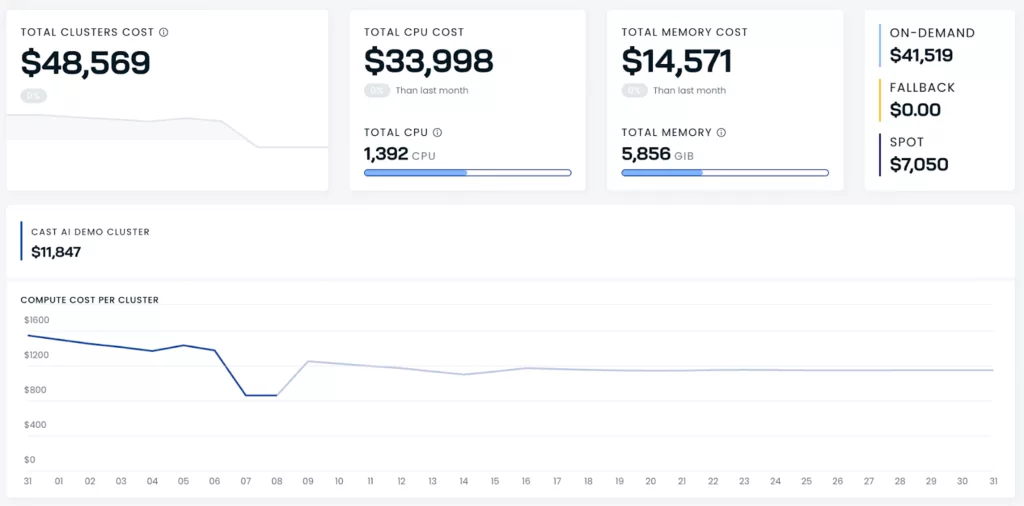
Another benefit of daily cloud cost reports is that they help identify areas where usage needs improvement, as well as anomalies. You can check how much you spent each day over the past two weeks and carefully review the data for anomalies or cost spikes that could lead to cloud waste.
Resource Utilization: Overprovisioning and Cost Transparency
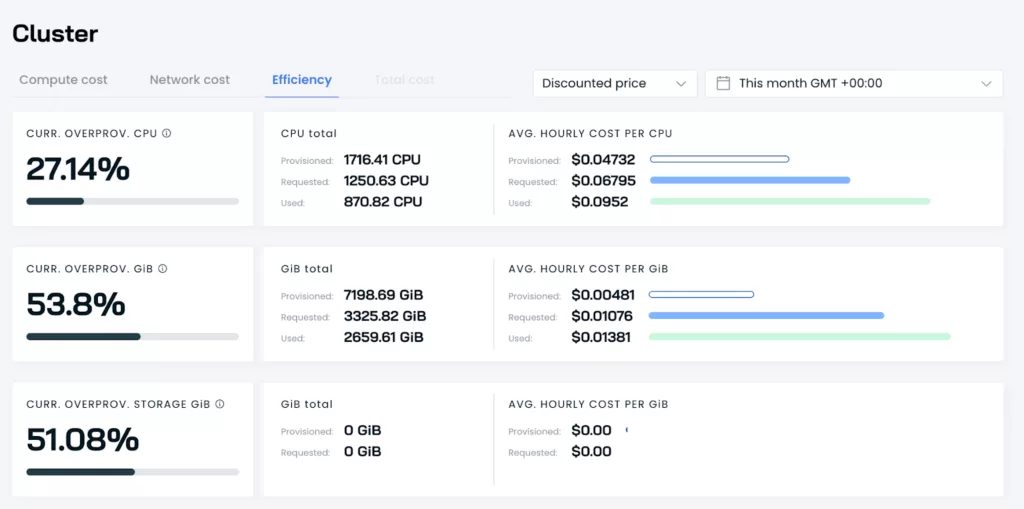
Monitoring resource utilization helps prevent overprovisioning and ensures cost transparency. It is a good idea to track both cost per provisioned CPU and cost per requested CPU. Why do these two need to be distinguished?
By comparing the number of requested CPUs with the number of CPUs actually allocated, you can spot the gap and calculate the cost per requested CPU. This improves the accuracy of cost reporting and gives you a better understanding of actual resource utilization.
If you run a Kubernetes cluster that has not been cost-optimized, there can be a significant gap between provisioned CPUs and the CPUs actually requested. In other words, you will find that you are paying for provisioned CPUs while only a tiny fraction of them are actually requested.
Let's illustrate with an example.
Below is an example of a reporting solution showing the current overprovisioning rate and an analysis of the average hourly cost for provisioned, requested, and used resources.
Reviewing Historical Cost Allocation Across Different Levels
Understanding the situation at different levels of the organization helps identify cost drivers and areas for optimization. Ideally, you should be able to get an overview of costs and resource consumption across multiple levels, starting at the organization-wide level and drilling down to a specific cluster, including the node, deployment, pod, and even container levels.
Suppose you are an engineering manager. The financial operations team has asked you why cloud costs have gone over budget again. What cost more than expected? This is exactly where historical cost allocation plays an important role. Using a report like the one below can save you hours, or even days, of identifying the cause of additional costs.
This report shows costs by allocation groups set up by Kubernetes users.
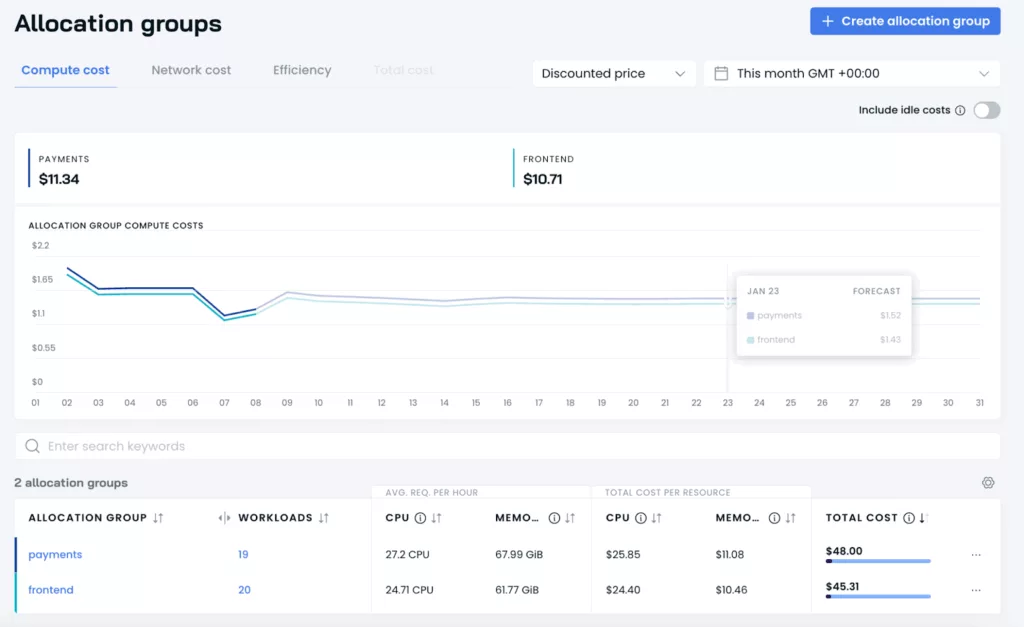
Checking last month's Kubernetes spending dashboard lets you immediately see the cost distribution by namespace or workload in dollars. Do you see workloads that cost a lot but are actually doing nothing? These are idle workloads and a major source of cloud waste.
☑️ Automating Kubernetes Cost Optimization
Managing Kubernetes costs manually can be a nightmare. To avoid these common pitfalls, you need a robust cost analysis process based on reliable data sources.
Here is an example.
Relying on manual strategies to manage Kubernetes cloud costs is risky. Manual approaches are typically time-consuming, error-prone, and difficult to maintain as scale grows.
Fortunately, automation solutions allow resources to be fine-tuned in real time. Deploying an automated Kubernetes cost optimization tool can save you a lot of headaches. Above all, it lets you focus on what matters most to your business: delivering high-quality service to your customers. No matter how good your manual optimization work has been, automation delivers far better results while requiring less effort and time from your team.
☑️ How Cast AI Solves Kubernetes Cost Problems
Cast AI is what makes this automation possible. It is a Kubernetes cost optimization automation platform used by more than 2,100 companies worldwide, enabling organizations to monitor resource usage at the organization-wide and cluster levels, automate resource allocation, and scale instantly without downtime.
Cast AI's key capabilities directly solve the cost problems discussed above through automation.
Let's look at the case of Bud to see what results these capabilities deliver in a real production environment.
☑️ Automated Kubernetes Cost Optimization in a Real Environment: Bud
Bud, a financial services company headquartered in the United Kingdom, enriches financial data to provide actionable insights and easy-to-understand inputs for LLMs in the financial services sector.
Bud initially aimed to increase visibility into the allocation and spending of its cloud costs. However, as the team began taking steps to optimize these costs, its focus shifted to increasing resource utilization without requiring manual checks in the future. This led to the idea of adopting an automation solution.
Bud uses Cast to automatically scale resources up and down and set workload requests and limits, increasing resource utilization and eliminating cloud waste. Bud's workload autoscaler rightsizes workloads, reduces CPU requests, and delivers new cost savings, dramatically improving CPU and memory utilization by up to 93%.
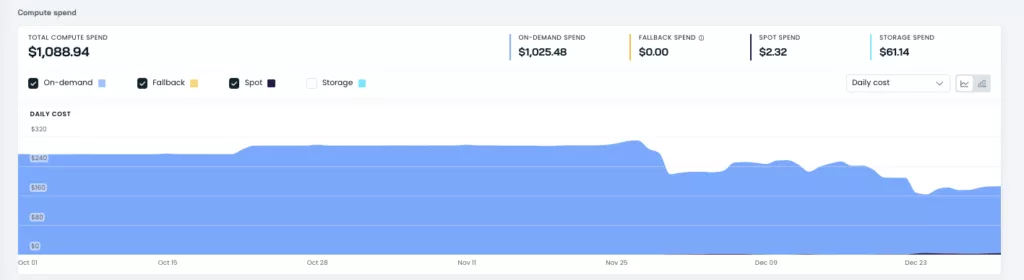
The image above shows the impact of the workload autoscaler on compute cluster costs.
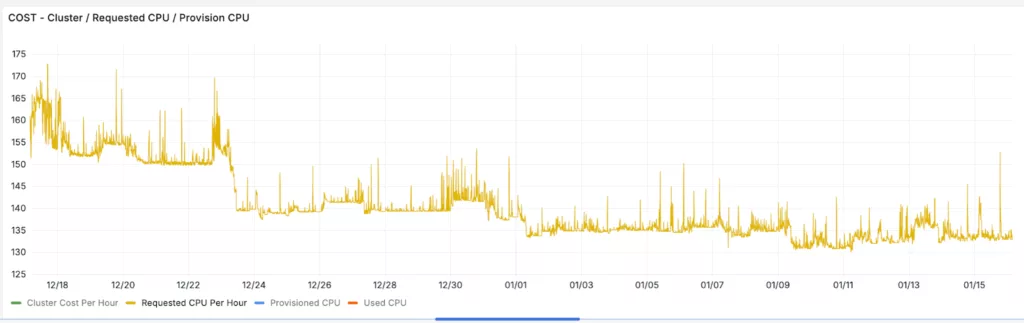
The image above shows the reduction in hourly CPU requests after integrating Cast.
☑️ Frequently Asked Questions
Q. What is Kubernetes cost optimization?
A. Kubernetes cost optimization refers to strategies for reducing infrastructure costs while maintaining performance. It is important because organizations often waste significant amounts on Kubernetes cloud resources that they do not use or underutilize.
Q. What tools can be used for cloud cost optimization?
A. Tools such as AWS Cost Explorer, Azure Cost Management, and Google Cloud Recommender provide cost visibility and optimization recommendations. In addition, automation solutions such as Cast AI play a key role in dramatically increasing resource utilization and reducing cloud cost waste.
Q. What are the main causes of cloud cost waste?
A. The main causes are overprovisioning, idle compute instances, inefficient data storage, excessive data transfer, and misconfigured autoscaling policies.
Q. What are the main challenges of cloud cost optimization?
A. Typical challenges include a lack of visibility into cloud spending, difficulty managing dynamic workloads, preventing overprovisioning, dealing with complex pricing models, and coordinating cost optimization in multi-cloud environments.
Q. How does autoscaling help with cloud cost optimization?
A. Autoscaling automatically adjusts resource capacity based on real-time demand so that you pay only for what you need. This prevents overprovisioning and lowers costs during low-usage periods.
Q. How can I make sure workloads are running cost-efficiently?
A. You should continuously monitor workload requirements and set CPU and memory requests and limits appropriately. This allows workloads to run in an optimal state without failures such as OOM kills.
Q. How can cloud storage costs be optimized?
A. Storage costs can be reduced by choosing storage tiers that match data access frequency, regularly deleting unused data, and compressing or deduplicating stored files.
Q. Where should I start with Kubernetes cost optimization?
A. Use monitoring tools to understand your current spending and first identify the workloads consuming the most resources. It is recommended to begin with immediate improvements, such as removing idle resources and adjusting excessive resource requests, and then expand to more advanced strategies such as refining autoscaling policies.
In Kubernetes environments, cost optimization is no longer optional but essential. Engineers spend hours, even days, configuring requests and limits and understanding the complexity of cloud provider services. DevOps teams are often so absorbed in technical implementation details that they lose track of a project's financial progress. Automating DevOps tasks reduces the burden of repetitive, high-volume work, freeing teams to be more creative and innovative. Teams can also apply their expertise to solving more complex problems, developing new features, and improving customer value.
As an official partner of Cast AI, CloudNetworks supports cloud cost reduction and automation adoption for Kubernetes environments. For adoption reviews or technical inquiries, please contact CloudNetworks.
▶ Cast AI Learn More