

As enterprises move generative AI from pilot stage into actual production operations, the share of GPUs in cloud costs is growing rapidly. Even after finishing model selection and serving environment setup, it's a recurring situation to open the bill and find a larger amount than expected.
The problem isn't how many GPUs you've secured, but how much of the secured GPU capacity you're actually using. According to Cast AI's 2026 State of Kubernetes Optimization Report, which analyzed thousands of clusters across AWS, Azure, and GCP, the average GPU utilization of production Kubernetes clusters is 5 percent. Since GPUs are billed at the full hourly rate regardless of how much work they actually did, the remaining 95 percent is capacity that only generates cost.
This gap can be narrowed without adding new hardware. There are five ways to reduce LLM inference costs in Kubernetes environments: GPU sharing, continuous batching, quantization, rightsizing, and autoscaling. Each method's problem, what to check in operational environments, and Cast AI's automation approach are laid out in order below.
☑️ What is LLM inference cost optimization
LLM inference cost optimization refers to methods for reducing the GPU compute and memory costs of serving large language models on Kubernetes. It includes raising usage efficiency through GPU sharing and batching, adjusting GPU requests to match actual usage, and automatically scaling inference endpoints up and down according to demand. Scale-to-zero, which drops replicas to zero when idle, also falls under this.
The key point is that most inference spending goes not to actual computation but to idle capacity. Therefore, the starting point for reducing costs isn't changing the model — it's reducing the time that already-secured GPUs sit stopped between requests.
☑️ Why GPU utilization determines inference cost
Changing only the processing method on the same hardware significantly changes cost per token. Running Llama 3.1 70B on a single H100 with single-stream processing costs roughly $0.60–$0.80 per million tokens. Applying continuous batching with a batch size of 8 under the same conditions brings that down to $0.15–$0.25 per million tokens. The GPU didn't get faster — the result comes from no longer leaving the GPU idle between requests.
These figures were measured under Cast AI benchmark conditions: Llama 3.1 70B FP8, H100 80GB SXM5, vLLM 0.5 or higher, 512-token prompts with 256-token outputs, and AWS eu-west-1 region H100 spot pricing of roughly $2–4/hour (2025). The savings shown apply to short contexts of about 2K tokens or less; as context grows longer, the KV cache competes with weight memory, reducing the batch size that can be maintained.
The utilization gap also appears across clouds. By Cast AI's measurements, Azure AKS was at 2 percent, Amazon EKS at 5 percent, and Google GKE at 6 percent. The highest-utilization cluster in the same dataset was a 136-node H200 configuration that reached 49 percent. The gap between 5 percent and 49 percent is a range that can be closed without replacing hardware.
The cost of idle resources becomes clearer once calculated. H100 spot prices range from $2–6/hour depending on cloud and region; even at $3/hour, a single idle replica consumes $2,160/month. At major clouds' on-demand price of $8–12/hour, that's $5,760–$8,640/month — figures for a single replica.
☑️ Five approaches to increasing GPU utilization
1. GPU sharing: MIG and time-slicing
A single A100 80GB can concurrently host multiple independent inference workloads. NVIDIA MIG (Multi-Instance GPU) splits a single physical GPU into hardware-isolated partitions, each with dedicated memory, compute resources, and L2 cache. Rather than virtualization, it behaves like an independent physical device.
The MIG profiles for the A100 80GB are as follows.
| Profile | Memory | Models it can host |
| 1g.10gb | 10GB | INT4/GPTQ 7B models (~4–5GB) or small embedding models |
| 2g.20gb | 20GB | 7B INT8 (~7GB), 13B INT8 (~13GB) with room for KV cache |
| 3g.40gb | 40GB | INT4/AWQ models up to ~30GB. INT4 70B (~35GB) is close to the partition limit |
| 7g.80gb | Full 80GB | 70B models at AWQ precision, or 34B+ FP16/BF16 models |
There's one constraint to note. Each MIG partition runs an independent model instance, and because of hardware isolation, NVLink and P2P CUDA communication between partitions is disabled. It's structurally impossible to configure tensor parallelism across two MIG slices of the same A100, so if a 70B model needs to be split across multiple cards, NVLink-connected physical GPUs must be used instead of MIG partitions. In Kubernetes, the nvidia-device-plugin exposes MIG partitions as schedulable resources, and a deployment targeting a 3g.40gb partition is configured by requesting the nvidia.com/mig-3g.40gb resource in the resource spec.
For T4, A10G, and older Ampere cards that don't support MIG, time-slicing is the alternative. Time-slicing multiplexes GPU access at the scheduling level rather than through hardware partitioning, so multiple pods share the same GPU context. Since there's no memory isolation between tenants, noisy-neighbor effects can actually occur, making it more suitable for development workloads or low-priority batch jobs than for latency-sensitive production inference.
2. Continuous batching, speculative decoding, and prefix caching
Static batching waits until a batch is full before processing requests together. This works for offline jobs, but in online inference it forces short requests to wait for long ones to finish, dropping throughput and spiking tail latency. Continuous batching solves this by treating generation as a stream of individual iterations. Instead of waiting for an entire batch to finish, a new request joins as soon as a slot opens up, and this is the default approach used by vLLM. It delivers 3–5x higher throughput than static batching on the same hardware budget, and P99 latency also improves on workloads with mixed request lengths.
Speculative decoding is a method where a small draft model proposes several tokens ahead of time and the main model verifies them in a single forward pass. Since token generation in autoregressive LLMs is bound by memory bandwidth rather than compute, verifying several draft tokens costs nearly the same as verifying one. When the proposals are correct, multiple tokens are obtained from a single forward pass. In environments where per-request latency matters — chat interfaces or copilot tools with batch sizes of 1–2 — this can cut generation latency by 30–50 percent. As concurrency or batch size increases, the overhead of running the draft model in parallel reduces the net gain, so the effect should be measured at actual request concurrency levels before applying it.
Prefix caching stores the KV state of a repeated prompt prefix in GPU memory for reuse. Most chat and RAG workloads send the same system prompt with every request; without caching, the model recomputes the KV state for that prefix on every call. In an environment using a 70B model with a 512-token system prompt, the wasted prefill computation is substantial. In chat or RAG deployments with long, shared system prompts, prefix caching can eliminate 60–80 percent of the prefill computation for repeated queries. This reduces time-to-first-token and raises effective throughput on the same hardware.
3. Quantization and cost per token
Quantization lowers the numerical precision used to store model weights. Fewer bits per parameter means lower VRAM usage and higher memory throughput, and depending on the hardware, faster computation as well. In exchange, the rounding error introduced by lower precision accumulates as it passes through layers.
Which format is suitable depends on GPU architecture.
| GPU | Architecture | Recommended format | Characteristics |
| H100 80GB, H200 | Hopper | FP8 | Native FP8 tensor core support. Half the VRAM of BF16, 1.5–1.8x throughput |
| A100 80GB (production 70B) | Ampere | AWQ / INT4 | AWQ 4-bit shrinks 70B to ~35–37GB, leaving ~40GB of 80GB for KV cache |
| A100 80GB (small models or accuracy priority) | Ampere | INT8 | Keeps 1 byte per parameter. 70B INT8 is ~70GB, leaving almost no room for KV cache |
| T4, L4, A10G | Turing / Ampere | INT4 / GPTQ / GGUF | Constrained to 16–24GB VRAM. Mainly small models, with greater accuracy loss |
VRAM calculation matters here. Running a 70B model in FP16/BF16 requires about 140GB just for weights, but applying AWQ 4-bit on an A100 80GB reduces that to about 35–37GB, leaving roughly 40GB for KV cache and activations. FP8 inference requires native FP8 hardware support, meaning an H100 80GB or H200; running FP8 via software emulation on an A100 loses output quality with no throughput benefit. The degree of accuracy loss varies by format, model family, and task type. On H100/H200, FP8 typically shows less than 1 percent MMLU accuracy drop versus BF16; on A100, AWQ shows 1–3 percent, and INT4 (GPTQ/GGUF) shows 3–6 percent. AWQ preserves accuracy better than plain INT8 because it identifies and protects the most sensitive weight channels. Whatever format is used, it needs to be benchmarked against the actual model and task before production deployment.
4. Rightsizing GPU requests
Over-provisioning is close to the default behavior in Kubernetes GPU deployments. Requesting an H100 80GB for a workload that uses 9GB results in the GPU running at 8 percent utilization while being billed at 100 percent. This pattern repeats across the fleet as scale grows.
Rightsizing means aligning resource declarations with actual peak usage rather than worst-case assumptions. There are three metrics to check for inference workloads.
GPU memory utilization is measured per container using nvidia-smi or the DCGM exporter. A pod that requested 40GB but peaks at 18GB should be moved to a smaller partition or instance type. SM utilization shows whether the model is bound by compute or by memory bandwidth. Since most inference workloads are bound by memory bandwidth rather than compute, low SM utilization alongside high memory bandwidth utilization is normal behavior, not waste. Looking at this metric alone can lead to the wrong conclusion about cutting resources. Token throughput versus SLO is the basis for setting autoscaler thresholds — define a minimum tokens-per-second target per replica, scale out when it falls below target, and scale down instance size when it significantly exceeds target.
A common mistake is requesting only the nvidia.com/gpu resource without specifying a MIG profile or instance type. This lets the scheduler place the pod on any available GPU, resulting in situations like a 7B INT4 model landing on an H100 80GB. Explicit resource labels, node selectors, and node affinity rules need to be used to pin workloads to the correct GPU tier.
5. Autoscaling and scale-to-zero
Idle GPU replicas are the most expensive line item in the inference budget. A static deployment that never scales down keeps getting billed for unused capacity. Kubernetes HPA scales by default on CPU and memory, but neither is a meaningful signal for GPU inference workloads. Autoscaling suited to LLM inference uses inference-specific signals instead.
Queue depth is the number of inference requests waiting for a slot; a growing queue is a leading indicator of capacity shortage before latency actually degrades. Tokens per second per replica serves as the basis for scaling out when it persistently falls below the SLO target, and scaling in when it persistently exceeds it. GPU memory pressure is checked via KV cache utilization; exceeding 80 percent signals that OOM-triggered eviction or quality degradation from KV cache eviction policy is approaching. KEDA (Kubernetes Event-Driven Autoscaler) supports Prometheus-based custom metrics, making it the standard choice for inference-aware autoscaling.
The strongest form of cost control is scale-to-zero. For development endpoints, internal tools, or low-traffic models, dropping replicas to zero when idle eliminates the holding cost. The trade-off is cold-start latency. Loading a 70B AWQ model from object storage into GPU memory on an A100 80GB takes 30–90 seconds depending on storage bandwidth. Latency-sensitive workloads should keep at least one warm replica, while batch or asynchronous workloads can reasonably default to scale-to-zero.
☑️ How Cast AI supports these five approaches
Manually implementing these five approaches means managing five separate sets of tools, configurations, and response paths. Cast AI automates all of them simultaneously within a single control plane.
GPU sharing: three partitioning methods and automatic placement
Cast AI shares and partitions GPUs through two methods: time-slicing and MIG. Time-slicing works on all NVIDIA GPUs, supports 1 to 48 replicas per GPU, and lets the sharing ratio be configured differently per GPU type according to workload density. MIG creates hardware-isolated partitions on A100, A30, and H100, and since each partition has dedicated compute cores and memory, noisy-neighbor issues don't occur. The two methods can also be combined. Applying 4-way time-slicing to each of 7 MIG partitions allows 28 workloads to run concurrently on a single A100 — useful for inference environments running multiple model versions or A/B tests where a single partition isn't fully utilized by one workload.
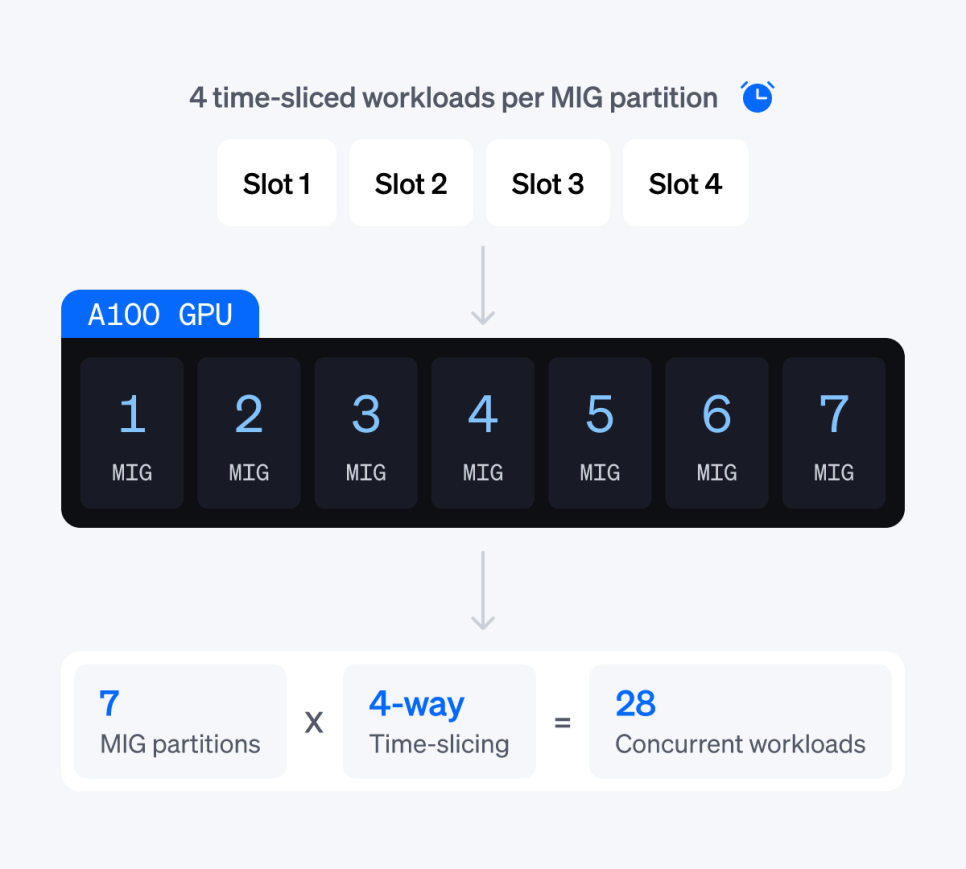
Cloud support varies. Time-slicing is supported on AWS EKS and GCP GKE, with EKS requiring Amazon Linux 2023 or Bottlerocket. MIG is supported on EKS and GKE, with EKS requiring Bottlerocket. On AWS G6 instances, pre-partitioned Fractional GPUs are available. Configuration is done at the node template level, so workload manifests don't need to be modified. Applications request resources as usual, while the sharing configuration is managed at the infrastructure layer.
A placement engine sits on top of this. Cast AI automatically bin-packs workloads across shared and partitioned GPUs, filling utilization on existing nodes before scaling up new ones. Because the placement algorithm accounts for MIG partitions, sharing configuration, and workload requirements together, no scheduling logic needs to be embedded in manifests.
Rightsizing resource requests: applied without restarts
Manual rightsizing is slow and carries risk, which leads teams to play it safe by over-provisioning resources. The Cast AI Workload Autoscaler analyzes historical and real-time metrics together to match CPU and memory requests to actual usage patterns. Because it supports in-place pod resizing — changing resource allocation for a running pod without a restart — adjustments don't interrupt service, and either an immediate mode that applies changes right away or a delayed scaling mode that applies them during maintenance windows or low-traffic periods can be chosen. Unexpected traffic spikes are automatically handled by scaling resources up.
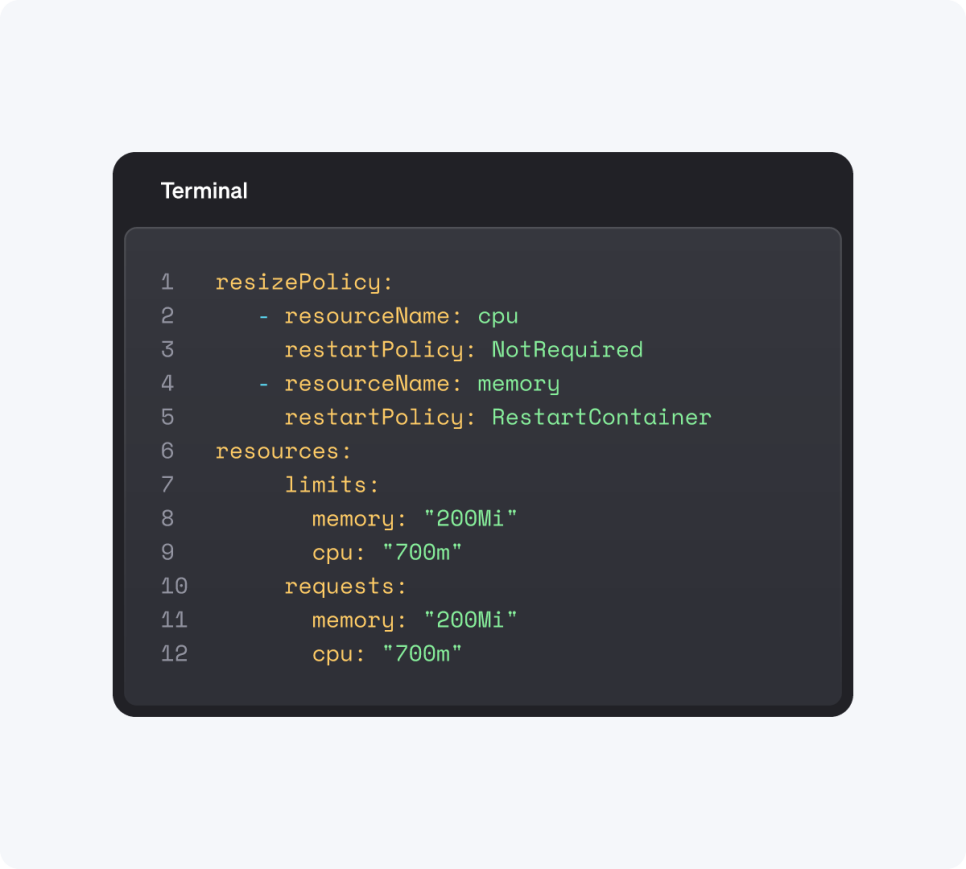
Vertical and horizontal scaling are a combination that tends to conflict when used together. The Workload Autoscaler combines HPA and VPA while coordinating the conflicts between them, reflecting both short-term demand spikes and long-term trends, and proactively prevents out-of-memory crashes through adaptive memory adjustment. It applies to Deployments, StatefulSets, Jobs, and CronJobs, and can cover custom workloads through label-based selection. Workloads that were hard to move due to persistent storage can now move between nodes via container live migration, which also reduces node fragmentation and expands room for bin-packing.
Per figures published by Cast AI, average CPU utilization before optimization is 8 percent, and OOM kills are nearly eliminated after automatic rightsizing is applied. Cloud cost savings customers report range from 30–70 percent, based on Cast AI's 2026 State of Kubernetes Optimization Report and customer cases such as Akamai and Wio Bank. For GPU resources, DCGM metrics are continuously read to generate recommendations based on observed workload behavior. Because this is based on actual measurements rather than static rules, the gap between provisioned capacity and actual consumption can be narrowed even in shared clusters running a mix of model sizes, without running manual profiling cycles.
Node lifecycle: taking down nodes, not just pods
The point where autoscaling diverges from HPA is at the node level. HPA scales down pods, but the underlying node keeps being billed. Cast AI's workload autoscaling is directly linked to GPU node lifecycle management: when the last inference replica goes down, the underlying GPU node is released to stop billing, and when demand returns, a new node is provisioned while pod scheduling proceeds in parallel. This linkage is essential for scale-to-zero to actually translate into cost savings — pod scale-down has to reach all the way to node release.
When spinning up a new node, it reads the workload's resource requests and matches them to a suitable instance type across spot and on-demand pools. Since it prioritizes spot instances while automatically falling back when they're reclaimed, spot can be applied to latency-insensitive inference work while maintaining operational stability. AI demand tends to be bursty, and GPU capacity itself is continuously scaled up and down to match actual workload demand. Declaring a MIG resource label in the deployment spec automatically provisions node types that offer that partition, removing the need to manually select an instance.
Securing GPU capacity: OMNI Compute for AI
If the first three points above are about how well you use GPUs you've already secured, there's one more problem that comes before that: not having GPUs available in the region you need, when you need them. Cast AI treats this not as a cost optimization problem but as a capacity sourcing and coordination problem.
OMNI Compute for AI extends an existing Kubernetes cluster to GPU capacity across multiple clouds and regions. Remote GPU nodes join the cluster as native nodes, so no application code changes are needed. The connection runs over a WireGuard secure connection via Crossplane and CRD-based provisioning, configuration can use Terraform, and GPU driver installation is handled automatically when a node comes up. Before provisioning a node, the autoscaler compares spot and on-demand pricing across all edge locations connected to the main cluster region, and launches the node wherever capacity is available at the lowest cost. Cost, performance, and compliance conditions can be set per workload, so control over where things run is retained.
Organizations that already have secured capacity can use this without procurement. Reserved capacity in another account, private cloud nodes, or their own infrastructure can be connected to the existing cluster, handing off only placement, sharing, and visibility management — keeping existing contracts and providers while changing only how they're operated. Suitability still depends on workload character, however. GPU-intensive workloads, batch processing, data processing pipelines, and stateless applications are a good fit, while latency-sensitive ML training jobs or database workloads requiring persistent volumes are not. This is why inference and batch workloads are OMNI's primary target.
Visibility: identify where the leak is first
For organizations just starting optimization, there's a sequence to follow. First, check GPU utilization, memory usage, and performance per workload in real time, then allocate that usage by workload, team, and application to understand who is using what. Finding idle capacity and surfacing optimization recommendations comes attached to this step. At this stage, most teams discover that 2–3 workloads account for most of their GPU spend, and addressing those first frees up resources for further optimization work.
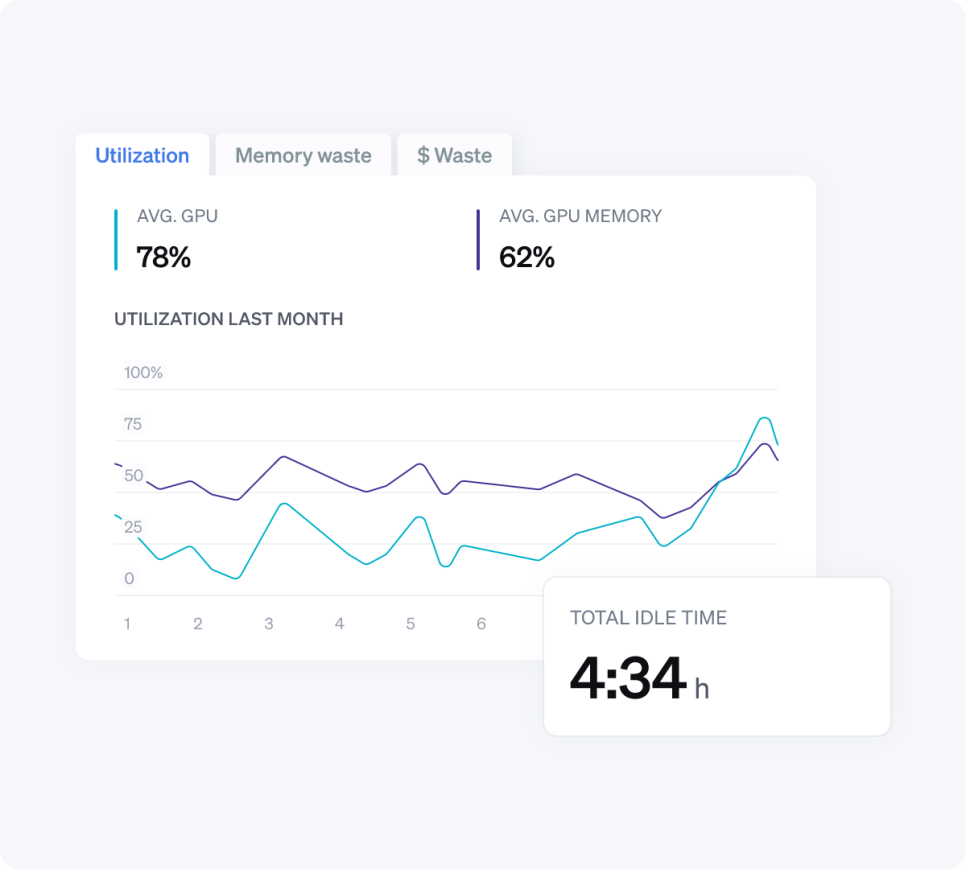
There are real-world applications of this as well. Fairgen, a generative AI company running production LLM inference on Kubernetes, cut GPU infrastructure costs by 70 percent after adopting Cast AI without changing its model stack or serving framework. The savings came from node rightsizing, node release through autoscaling, and applying spot instances to latency-insensitive inference work.
☑️ Frequently Asked Questions
Q. What is the biggest cause of high LLM inference costs?
Idle GPU capacity. Per Cast AI's 2026 State of Kubernetes Optimization Report, most production Kubernetes clusters run GPUs at an average utilization of 5 percent. Since GPUs are billed at the full hourly rate regardless of actual utilization, the biggest savings come from closing this gap through batching, sharing, and autoscaling.
Q. Does quantization reduce model output quality?
Yes. Lowering precision introduces rounding error. FP8 on H100 typically shows less than a 1 percent MMLU accuracy drop versus BF16; AWQ on A100 shows 1–3 percent, and INT4 (GPTQ/GGUF) shows 3–6 percent. Benchmarking against the actual model and task is necessary before production deployment.
Q. Can a 70B model run on a single A100 80GB?
Yes, with AWQ 4-bit quantization applied. Weights shrink to about 35–37GB, leaving roughly 40GB on an 80GB device for KV cache and activations. INT8 keeps 1 byte per parameter, making a 70B model about 70GB, leaving almost no room for KV cache. FP8 inference with native hardware acceleration requires an H100 80GB or H200.
Q. Can tensor parallelism for a 70B model be configured across MIG partitions?
No. MIG partitions are hardware-isolated, which disables NVLink and P2P CUDA communication between MIG instances on the same physical GPU. Since tensor parallelism assumes high-speed inter-GPU communication, TP-2 or higher requires NVLink-connected physical GPUs rather than MIG partitions.
Q. Can HPA alone reduce GPU costs?
There are limits. HPA scales down pods, but the underlying node keeps being billed. For GPU costs to actually decrease, pod scale-down needs to lead to node release. Cast AI's workload autoscaling stops billing by releasing the underlying GPU node when the last replica goes down.
☑️ Conclusion
LLM inference cost is determined not by how many GPUs you've secured, but by how little you leave them idle between requests. GPU sharing puts multiple workloads on one card, continuous batching eliminates gaps between requests, quantization reduces memory requirements, rightsizing narrows the gap between requested and actual usage, and autoscaling releases idle nodes — all five point in the same direction. The gap between an average of 5 percent and a peak of 49 percent is a range that can be closed without changing hardware.
That said, operating these five approaches as separate tools and configurations increases management overhead accordingly. Cast AI automatically handles GPU sharing, placement, rightsizing, and node lifecycle management within a single control plane, going beyond showing costs to actually taking action. CloudNetworks, as Cast AI's domestic partner, supports customers from adoption review through implementation and operation tailored to their environment. If you're weighing GPU cost management alongside growing AI workloads, please contact CloudNetworks.
▶ Learn more about Cast AI
[Source: CAST AI, "LLM Inference Cost Optimization: Run AI Inference for Less", https://cast.ai/blog/llm-inference-cost-optimization/, CAST AI, "GPU Optimization for AI Infrastructure", https://cast.ai/gpu-optimization/, CAST AI, "GPU Sharing", https://cast.ai/gpu-sharing/, CAST AI, "Cross-Cloud GPU Access", https://cast.ai/cross-cloud-gpu-access/, CAST AI, "Kubernetes Workload Optimization & Rightsizing", https://cast.ai/workload-optimization/, CAST AI, "Multi-Cloud and Cross-Region GPU Capacity for Kubernetes AI", https://cast.ai/blog/multi-cloud-gpu-kubernetes/, CAST AI, "GPU sharing methods", https://docs.cast.ai/docs/gpu-sharing, CAST AI, "Multi-Instance GPU (MIG)", https://docs.cast.ai/docs/gpu-sharing-mig, CAST AI, "What is OMNI?", https://docs.cast.ai/docs/omni-overview, CAST AI, "2026 State of Kubernetes Optimization Report", https://cast.ai/reports/state-of-kubernetes-optimization/]